
The Lose It alternative for GLP-1 users
Looking for a Lose It alternative on a GLP-1? Holt lines up meal photos and severity-rated side effects with your doses, and builds a doctor-visit report.
| Holt | Lose It | |
|---|---|---|
| Side effects | Severity sliders lined up against dose days | Not listed |
| Injection sites | Site history, plus a suggested next spot | Not listed |
| Report for doctor visits | PDF (30d/90d/full history) with suggested questions | Not listed |
| Meal photo scan | Calories, protein, fiber, carbs and fat | Photo meal logging with Premium |
| Estimated medication levels | Yes (7d/30d), with last- and next-dose countdown | Yes, with phases shown against hunger and eating habits |
| Dose logging | Shots and pills, with reminders and a Live Activity | Medication logging |
| Food log | Search, recents, favorites, my meals, custom foods | Database search; barcode scan and AI voice logging with Premium |
| Languages | 15 | 8 |
| Platforms | iPhone | iPhone, iPad, Apple Watch, Mac, Android |
| Price | Free download; optional subscription $7.99/wk, $14.99/mo or $49.99–$69.99/yr | Free; Premium in-app purchases listed from $9.99, including lifetime options |
- 1
Holt
Our top pickBest for: People on a GLP-1 who want doses, meals and side effects connected on one timeline · Platforms: iPhone
Holt is a GLP-1 tracker first. It logs shots and pills with reminders and a Live Activity, charts estimated medication levels with a next-dose countdown and suggests the next spot in your injection rotation. A meal photo gives you calories, protein, fiber, carbs and fat; side effects get a severity and sit against your dose days; and a doctor-visit PDF turns it all into something to bring to your prescriber.
Pros
- Side effects rated by severity and lined up against the dose before them
- Five-nutrient meal photo scan, built for eating enough on a quiet appetite
- Suggests your next injection site and keeps your site history
- Doctor-visit PDF with suggested questions for your prescriber
- Medication-level chart, Live Activity and widgets, in 15 languages
Cons
- iPhone only for now
- Some features are part of the optional subscription

- 2
Lose It
Best for: Calorie counters who want GLP-1 levels next to a classic weight-loss plan · Platforms: iPhone, iPad, Apple Watch, Mac, Android
A long-running calorie counter with a free weight-loss plan and community, Premium photo and voice logging, barcode scanning and advanced tracking, and new GLP-1 support for logging medication and viewing estimated GLP-1 levels alongside hunger and eating habits.
Pros
- Estimated GLP-1 levels shown next to nutrition, weight and activity
- On iPhone, iPad, Apple Watch and Android, with lifetime Premium options
Cons
- Side-effect logging, injection sites and a doctor report aren't listed
- Photo logging and barcode scanning are Premium features
You open Lose It after a shot day and log a breakfast of half a banana. The app shows you sailing under budget. What it can't tell you is whether the heartburn you had last night is the same heartburn you had after last week's shot, or whether you've had enough protein to feel steady by the afternoon.
A quick note: this page is written by the team behind Holt. Lose It details come from its App Store page, checked on November 1, 2026.
Why does a weight-loss calorie counter feel off on a GLP-1?
Lose It's subtitle is "Food Tracker for Weight Loss", and its core is a calorie budget and a weight-loss plan. That was the right design for years of dieting, where the hard part was eating less.
A GLP-1 often does the eating-less part for you. The harder part becomes eating enough of the right things — protein, fiber, fluids — and making sense of how you feel in the days after each dose. A budget that rewards coming in low doesn't help much with either.
To its credit, Lose It has added GLP-1 support. Its listing says you can log your medication, view estimated GLP-1 levels, and see how each phase may line up with your hunger and eating habits. That's a thoughtful addition. What we couldn't find on the listing is the rest of the GLP-1 week: side effects, injection sites and something to bring to your prescriber.
Why do GLP-1 users switch to Holt?
Because Holt is built around the whole dose cycle, not just the food in it.
- Side effects with a strength and a date. Rate nausea, constipation, heartburn, food noise, suppressed appetite or fatigue on a slider — or add your own — and see them next to your dose days. "Day two is always rough" becomes something you can point at.
- Injection sites, handled. Log the site (arms, stomach or thighs, left or right) and Otto suggests the next spot in your rotation. Your dose history keeps strength, site and adherence together.
- A report for your appointment. Holt turns 30 days, 90 days or your full history into a doctor-visit PDF with suggested questions.
- Food in one photo. Snap your plate and Holt estimates calories, protein, fiber, carbs and fat, with protein, fiber and water on your home summary.
Holt also has an estimated medication-level chart with 7-day and 30-day views and a countdown to your next dose, so you don't lose that by switching.
What changes when you switch?
Logging gets more connected and, for most meals, quicker. A photo replaces a search. A slider replaces a mental note. And because everything sits on the same dose-day timeline, the pattern between your shot, your appetite and how you feel shows up without you building it yourself.
On cost: Lose It lists photo meal logging and barcode scanning as Premium features. Holt is free to download, with some features in an optional subscription — weekly ($7.99), monthly ($14.99) or annual ($49.99–$69.99) on the App Store.
What you'd give up: Lose It's Android, Apple Watch and Mac apps, its lifetime Premium options and its community features. Holt is iPhone only for now.
Should you stay with Lose It?
Stay with Lose It if:
- You use Android or want an Apple Watch app.
- You prefer a one-time purchase — Lose It lists lifetime Premium options.
- A level chart next to your calories is all you need, and you don't track side effects or sites.
If it's working, there's no prize for switching. Keep what helps.
What we'd track in your first two weeks with Holt
- Every dose with its site, so the next-site suggestion and the level chart have something to work with.
- Side effects with a severity, especially on shot day and the two days after.
- A photo of most meals, checking protein and fiber rather than the calorie total.
- Water every day, since fluids drop easily when appetite does.
- A doctor-visit report before your next appointment.
Whichever app you use, it records what you were prescribed and how you felt. Anything about your dose belongs with your prescriber or pharmacist.
See it in Holt
Real screens from the app — the same places you’ll log, review and share.
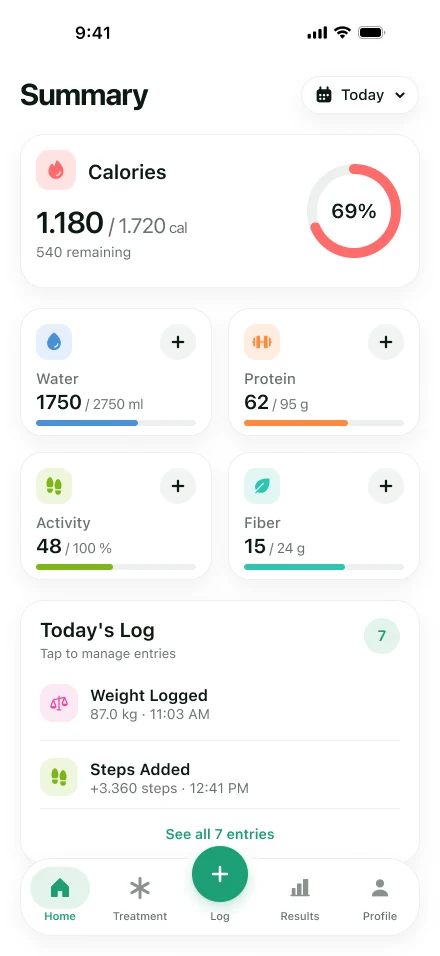
Your day at a glance 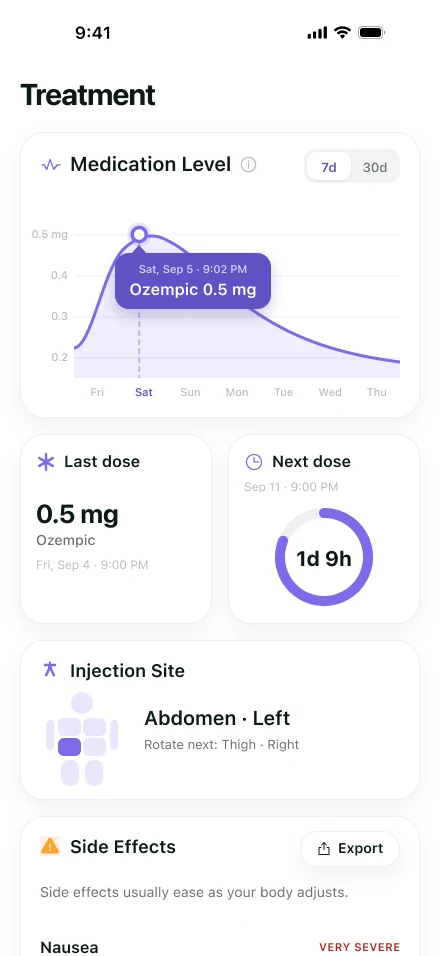
Medication level and next dose 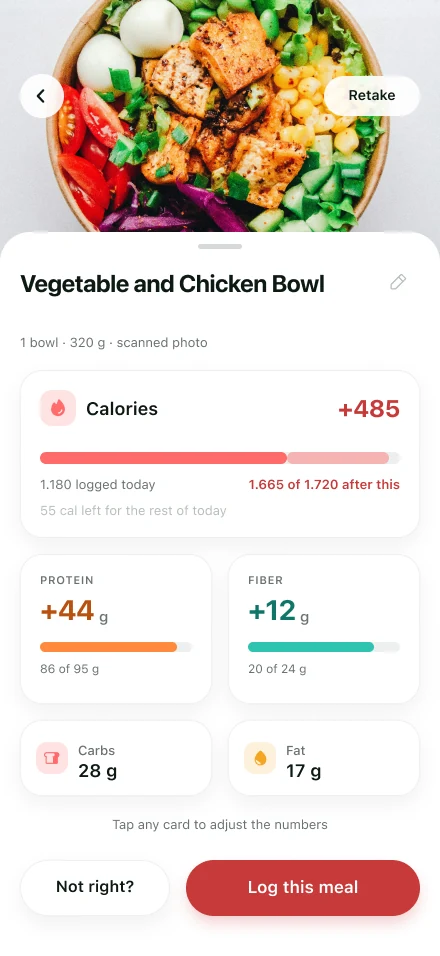
Snap a meal, get the protein
Frequently asked questions
Does Lose It have GLP-1 tracking?
Yes. Its App Store listing describes new GLP-1 support for logging your medication, viewing estimated GLP-1 levels and seeing how each phase may line up with hunger and eating habits. We couldn't find side-effect logging, injection sites or a report on the listing.
Is Holt better than Lose It on a GLP-1?
We make Holt, so take this with that in mind. Both show estimated medication levels; Holt adds severity-rated side effects on your dose days, a next-site suggestion, a five-nutrient meal scan and a doctor-visit report. Lose It is the pick if you need Android or want a lifetime purchase.
Can I import my Lose It history into Holt?
Neither listing describes a direct import. Holt syncs weigh-ins, steps and workouts with Apple Health, but past food and medication logs would stay in Lose It.
Is Holt free?
Holt is free to download, with an optional subscription for some features. Current prices are on the App Store listing.
Sources
- Lose It! – Calorie Counter (App Store) — Apple App Store
- Calorie Counter by Lose It! (Google Play) — Google Play
- GLP-1 Tracker & Shot Log - Holt (App Store) — Apple App Store
Keep reading
- Best GLP-1 Tracker AppsThe best GLP-1 tracker apps for 2026, compared. Why Holt is our top pick for iPhone, and where MeAgain, Shotsy, Glapp and MyFitnessPal fit instead.
- MyFitnessPal AlternativeLooking for a MyFitnessPal alternative on a GLP-1? Holt connects meal photos, side effects and dose days, with a medication-level chart and a doctor-visit report.
- Side Effect TrackerA GLP-1 side effect tracker for iPhone. Rate nausea, constipation, fatigue and more on a slider, add your own, and see how symptoms line up with dose days.
- GLP-1 Food TrackerA GLP-1 food tracker that logs meals from a photo, estimates calories and protein, and shows how what you ate lines up with shot days and side effects.