
An injection tracker that runs your weekly routine for you
An injection tracker app for iPhone that reminds you on shot day, shows a lock-screen Live Activity and suggests your next site so the weekly routine runs itself.
Worth remembering
- A phone alarm reminds you; it doesn't know whether you've already injected.
- A good tracker clears the reminder the moment you log, so you never second-guess.
- The Wegovy and Zepbound labels say to rotate injection sites with each dose.
- Setting up takes one sitting — medication, dose, shot day and time.
You set a recurring alarm for Sunday at 8 p.m. It works for a month. Then one Sunday you inject at lunch because you're out that evening, the alarm goes off anyway, and at 8 p.m. you stand at the fridge wondering whether the lunchtime shot was this week or last.
That's the gap between a reminder and a tracker. A reminder knows the time. A tracker knows what you've done.
What should an injection tracker app actually do?
Strip it down and there are three jobs:
- Remind you on the right day — and stop once you've logged.
- Make logging fast enough to do with the pen still in your hand.
- Remember the site so next week's injection goes somewhere new.
Everything else — charts, history, reports — builds on those three being reliable. If logging takes longer than the shot, the record will have gaps exactly when life gets busy.
How do the usual options compare?
| Phone alarm | Calendar event | Injection tracker app | |
|---|---|---|---|
| Reminds you on shot day | Yes | Yes | Yes |
| Knows if you already logged | No | No | Yes |
| Records dose and site | No | Only if you type it | Yes |
| Suggests the next site | No | No | Holt does |
| Shareable history for appointments | No | Not easily | Holt's Doctor Visit Report |
An alarm is genuinely fine if your routine never moves. Most routines move.
How do I set up a weekly routine that holds?
Do this once, ideally on your next shot day:
- Pick a day and time you can keep for most weeks — evenings at home suit many people. The Wegovy and Zepbound labels both say the weekly injection can be taken at any time of day, with or without meals, so choose for your life, not the clock. Our shot-day planner can help you weigh options.
- Enter your medication, dose and schedule in the app.
- Turn on notifications so the reminder and Live Activity can reach you.
- Log the first injection straight away, with its site. That entry starts your rotation.
If you ever need to move your shot day, check your medication's label or ask your pharmacist first — the rules differ between medications.
Why does site rotation need an app at all?
The Wegovy and Zepbound Medication Guides both say to change your injection site with each injection. You can stay in the same body area as long as the exact spot changes — and that's the part memory loses. Most people remember "stomach"; few remember "lower left" from seven days ago.
When the app stores the site with each dose, rotation stops being a memory test. Our injection sites guide covers the areas in detail, and there's a Zepbound-specific version for pens and vials.
What we'd track
- Each injection the moment you take it — date, time and dose. That's what makes the reminder trustworthy.
- The exact site, with side and position. Upper or lower, inner or outer, left or right.
- Any reaction at the site. Redness or soreness, and how long it lasted.
- Changes to the routine. A moved day or a missed week, so the history explains itself.
Here's how Holt handles it. On shot day, a reminder arrives and a Live Activity on your lock screen reads "It's shot time! Log your dose". In Log Injection you choose the site — arms, stomach or thighs; left or right; upper, lower, inner or outer — and Otto suggests the next spot in your rotation. The Treatment screen then shows "Last dose", a "Next dose" countdown such as 1d 9h, and an injection-site card with "Rotate next". Dose History keeps every injection with its strength and site.
Set up your shot routine in HoltWhen your next appointment comes round, the Doctor Visit Report turns that history into a PDF for the last 30 days, 90 days or your full treatment, with suggested questions to ask.
Written by the team behind Holt.
See it in Holt
Real screens from the app — the same places you’ll log, review and share.
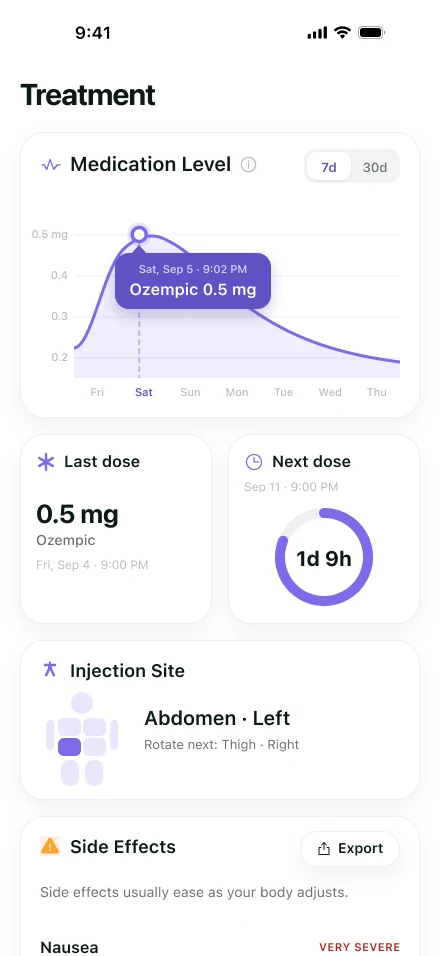
Medication level and next dose 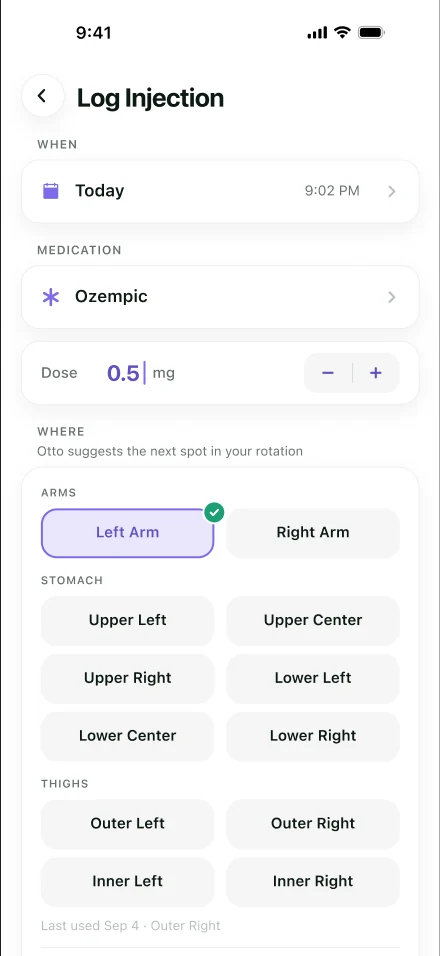
Otto suggests your next site 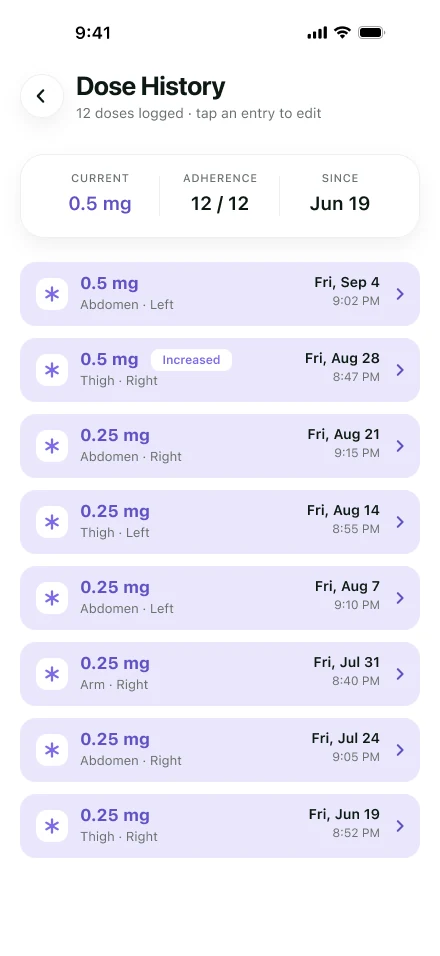
Every dose, every site
Frequently asked questions
Which injections can I track in Holt?
Holt is built for GLP-1 medications — semaglutide and tirzepatide, branded or compounded — with weekly injections or daily pills. You set your own dose and schedule.
What is the Live Activity?
On shot day, Holt can show a Live Activity on your iPhone lock screen — "It's shot time! Log your dose" — so the reminder sits where you'll see it and you can go straight to logging.
Does Holt work on Android or Apple Watch?
Not at the moment. Holt is iPhone only for now.
Is Holt free?
Holt is free to download, with an optional subscription for some features. The App Store listing shows current prices.
What if I miss the reminder and the window passes?
Don't double up to catch up. Missed-dose rules differ by medication, so check your label or ask your pharmacist what yours says.
Sources
- WEGOVY (semaglutide) prescribing information, Medication Guide and Instructions for Use — DailyMed, U.S. National Library of Medicine
- ZEPBOUND (tirzepatide) prescribing information, Medication Guide and Instructions for Use — DailyMed, U.S. National Library of Medicine
Keep reading
- GLP-1 Shot TrackerA GLP-1 shot tracker for iPhone that logs each weekly dose, rotates injection sites, reminds you on shot day and lines up side effects with dose days.
- GLP-1 Injection SitesWhere to inject a GLP-1 like Wegovy or Zepbound, what the labels say about rotating sites, and a simple way to keep track of where you injected last.
- GLP-1 Dose TrackerA GLP-1 dose tracker for iPhone that records every dose's strength and site, and shows your escalation history and adherence in one place.
- Zepbound Injection SitesWhere to inject Zepbound according to its Instructions for Use for the pen, vials and KwikPen, what to avoid, and an easy way to rotate sites every week.